
Move your Lab to the Web!
Use one of our 30+ pre-configured test paradigms or
create your own test script to setup a web-based experiment.
Sign up for an academic plan and
reach your students while studying from home
All academic plans are multi-user department licenses
Use the 30+ configurable test paradigms to setup hands-on exercises or define your own experiment using a scripting language.

Academic Research and Teaching
Have access to a large number of neuro-psychological test paradigms to profile and train your patients during visits or at home.

Patient Training and Monitoring
Integrate cognitive tests into clinical trials and leverage our secure platform to schedule sessions and monitor quality in real-time.

Clinical Studies
Clinical-relevant Task Paradigms on One Platform
- Psychomotoric Vigilance Test (PVT)
- Attentional Network Test (ANT, ANTR)
- Operational Memory Span (OSPAN)
- Trail Making Test (TMT)
- Hidden Path Learning (HPL
- Serial Arithmetic Task (SAT, PASAT)
- Tower of Hanoi (TOH)
- Flanker Task (FLT)
- Hearts & Flower (HAF)
- International Shopping List (ISLT)
- Symbol Digit Substitution Task (SDST)
- POMS
- Bond & Lader
- Karolinska Sleepiness Scale (KSS)
- PANAS
- Bowdle
Add your own Experiment
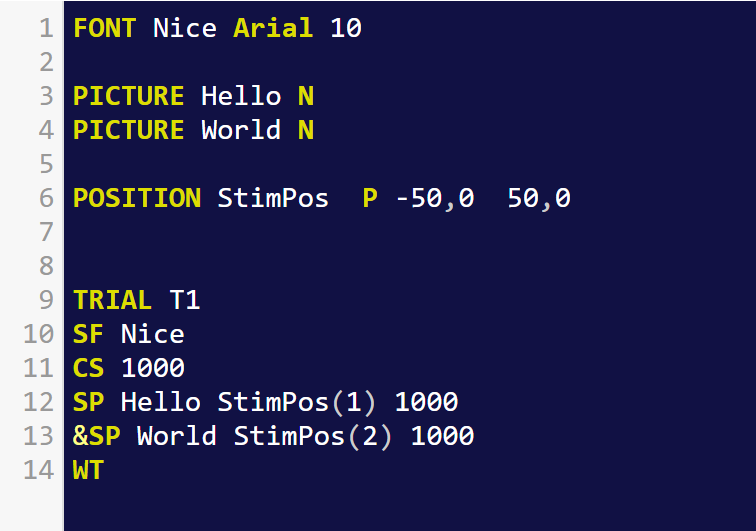
Use our simple, yet powerful ERTS scripting language to create your own experiment or teach students how to define experiments from scratch without having to deal with general purpose programming languages and development environments.
Share Your Script
Go to our free companion website Cognition Lib which provides an online editor to write and test scripts written in the ERTS scripting language. With only a few lines of scripting, you have a running experiment script which you can share and paste/copy to Cognition Lab as a new task paradigm and collect data.
The use of Cognition Lab has enhanced our Human-Machine Systems course in Mechanical and Industrial Engineering; in fact, it has been pivotal to meeting our primary course objective of using experimental data as a source of information about human performance characteristics
Cognition Lab is an important utility to assess cognitive ability as well as monitor patients with neurological disorders. In our studies it complements the parameters of at-home cognitive remediation and tDCS for patients with MS and Parkinson’s disease.
Flexible Deployment Modes
In-Lab
In this scenario, the lab assistant is manually launching the sessions from the Cognition Lab Console on dedicated test stations. List of participants, session schedule, and data will be managed in the cloud across multiple test stations and lab locations.
Walk-in
Prepare tests, session schedule of your study in the web-based Cognition Lab Console. Setup computers on one or multiple locations (e.g. school, hospital, elderly living home) and enroll participants as they walk by and agree to participate.
Remote
Invite participants to perform session outside of your lab on a managed device or their own devices. In this scenario, participants will receive unique URLs which they can use to launch their scheduled session. You can monitor progress and data from your Cognition Lab console.
Web-recruiting
Publish an URL to let volunteering participants sign up for your online study, or get called as an online task from recruiting systems such as SONA, Prolific, and MTurk . You can also integrate survey tools like Qualtrics to measure behavioral outcomes with a cognitive task.